
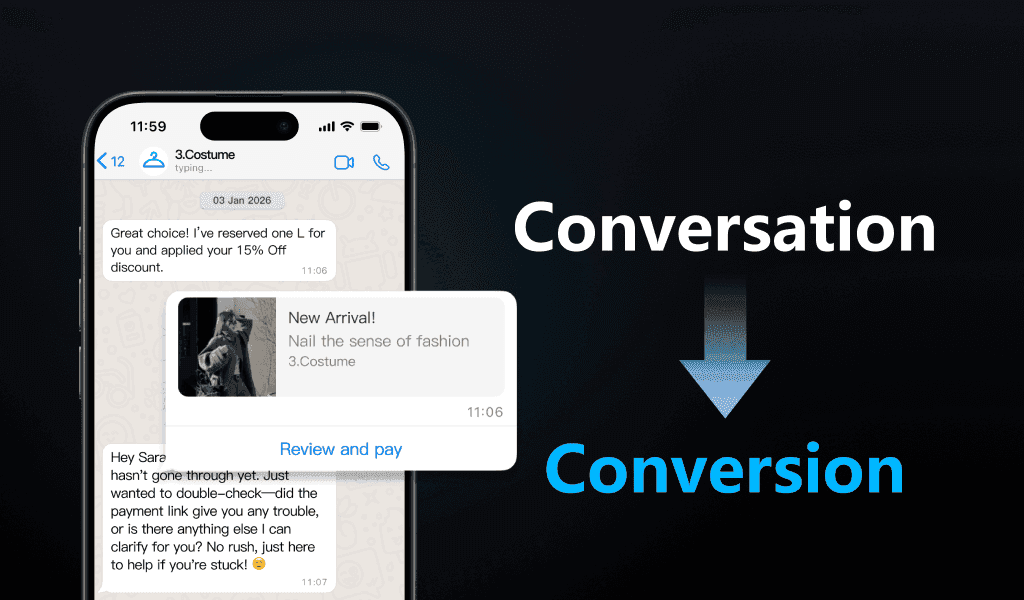
From Conversation to Conversion
Guide each high-intent conversation toward purchase, booking, lead capture, or qualified handoff.
For WeChat, Douyin, and Xiaohongshu, visit 3Chat China ↗
AI customer agents for conversation-led businesses.
Buying on social does not follow funnels. It happens in messy DMs, screenshots, voice notes, comments, and forgotten follow-ups.
Social commerce needs AI that can learn, decide, and act — not just reply.
3Chat.ai turns customer conversations across Instagram, WhatsApp, Messenger, and your store into qualified leads, bookings, purchases, and better service.
AI customer agents for businesses that sell and serve through social and messaging channels.

3Chat does not measure value by how many messages it answers.
It measures how well your AI sales team moves buyers closer to revenue.
Start FreeGuide each high-intent conversation toward purchase, booking, lead capture, or qualified handoff.
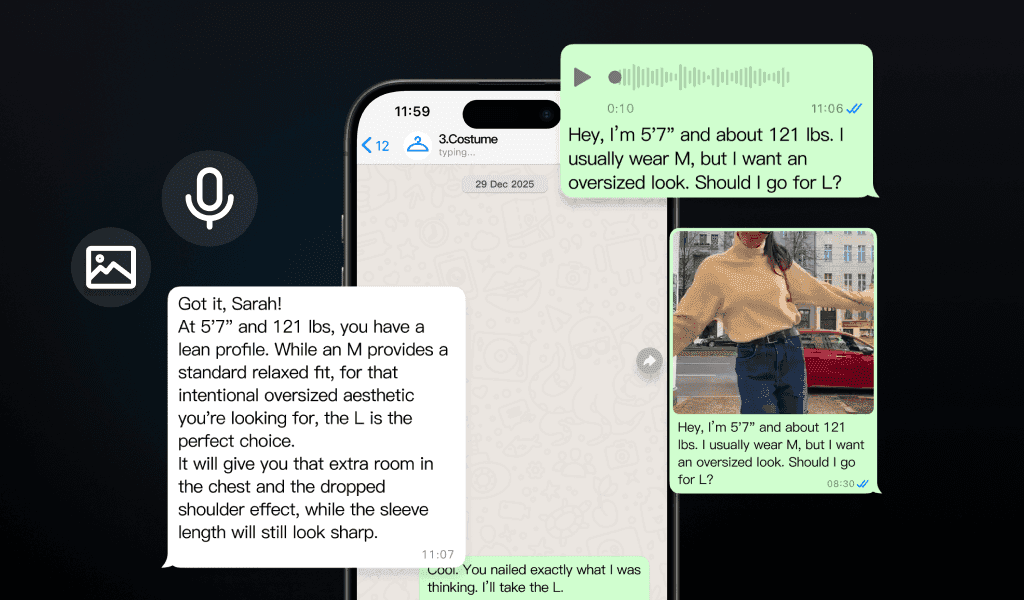
Understand messy DMs, screenshots, voice notes, product links, and fragmented buyer context.
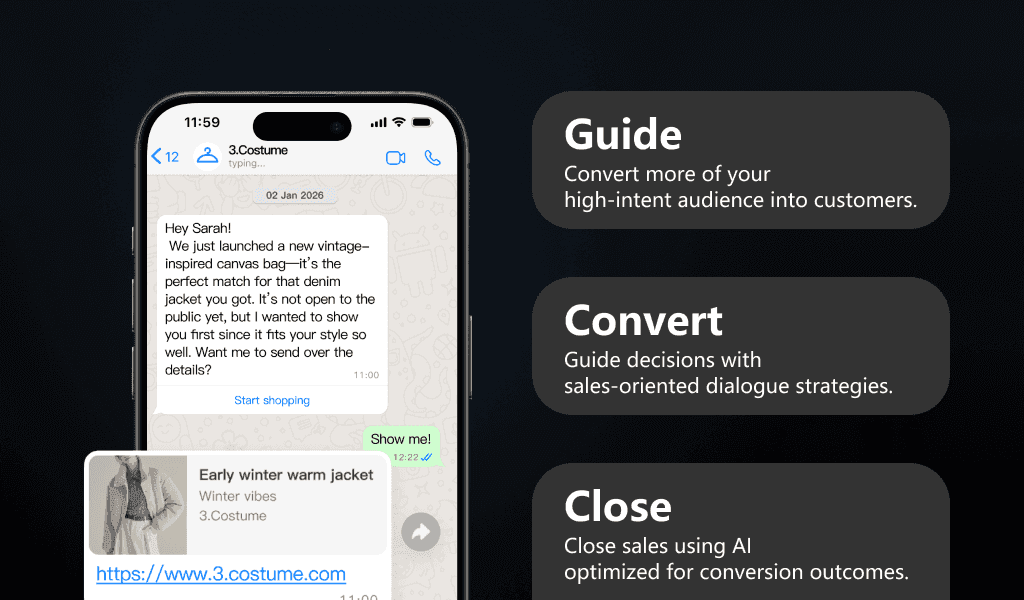
Turn real sales conversations into sharper knowledge, playbooks, and follow-up logic.
Where Revenue Leaks
Where Growth Happens
+45%
< 3s
3x
Connected to your business systems through MCP-style integration,
so your AI sales team can retrieve context, trigger actions, and keep improving.
Deep Dives · ~ 24 min · October 28, 2026
An Agent Runtime Designed for Conversational Marketing Most mainstream agent frameworks and runtimes are built around tasks: a user gives an instruction, and the agent works through a loop of thinking, calling tools and observing results until the task is done. When the session ends, its state ends with it. Conversational marketing is a different problem. In e-commerce and retail, local services, health and wellness, education, and technology, pre-sales marketing shares one trait: the agent's conversation with a customer goes on for a long time, and its goal is to move the customer from learning about a product to buying it and buying again. In this article, "customer" refers to a business's end consumer, and "client" refers to a business that uses 3Chat. We characterize this setting by four properties: Long-horizon Relationship: the unit of service is a customer, not a session; conversations can span weeks or even years. Stage-defined State: "state" here means the marketing stage. Each business defines the stages its customers move through, for example "requirements confirmation → proposal and quotation → negotiation → contract signed → delivery and acceptance → operations and service → repurchase and upsell", along with a marketing strategy for each stage. Multi-source Proactivity: besides messages from the customer, changes in customer data, events in the business, and commitments made with the customer in conversation can all be moments for the agent to speak. Low-resource Building: in businesses with these needs, agents are usually built by business and operations teams rather than dedicated AI engineering teams, so building an agent must have low learning, building and maintenance costs. To address these four properties, 3Chat AgentRuntime ("the Runtime") makes four design choices: a five-layer configurable memory organized per customer; capability boundaries computed from the marketing stage; one event model for both customer messages and proactive triggers; and a compilation and execution mechanism that makes natural-language definitions executable. We first present the main architecture and the execution model, then go through each of the four designs. General-purpose frameworks such as LangGraph [1], the OpenAI Agents SDK [2] and Google ADK [3] do not lack the building blocks: cross-thread storage, scheduled jobs, guardrails, handoffs, and session and memory services are all available. What they lack is domain semantics and default implementations. The Runtime makes customers, stages, triggers and boundaries first-class concepts¹ of the runtime. ¹ First-class concept: a primitive provided directly by the runtime, with its own data structure, lifecycle and persistence, whose reads, writes, scheduling and constraint checks are handled by the runtime rather than simulated by each application in its own business code. We use one example throughout. A high-end skincare brand runs private-domain customer operations on WeCom, with an agent acting as its online beauty advisor. After receiving a sample, Ms. Lin adds the brand on WeCom. Over 60 days she moves through five stages: product discovery, trial, objection handling, purchased, and repurchase. Along the way the agent speaks first three times; the last time, it reminds her, as she asked, before her coupon expires, and she buys the full-size product (Figure 1). 3Chat AgentRuntime Main Architecture As Figure 2 shows, one execution passes through five steps from top to bottom and ends by writing back the customer state. The tag at the top right of each module marks which of the four properties it serves. ① Trigger normalization and admission (Multi-source Proactivity): receives four kinds of sources and normalizes them into a trigger event e, the TriggerEvent in the figure. Proactive triggers go through the admit check here, and those that fail are dropped. ② Input understanding (IM conversation handling): turns channel messages into input the model can process. It merges consecutive messages from the same customer, normalizes voice, images and quoted messages into text or descriptions, and detects the conversation language. ③ Customer state and stage policy (Long-horizon Relationship, Stage-defined State): loads the customer state x_c for this customer and retrieves the stage policy Policy_k(S) for the current marketing stage S. This is the basis for computing the feasible action set A_t at every later step. ④ Execute within boundaries (Low-resource Building): runs as a ReAct-style loop, interleaving reasoning and acting and deciding the next step after observing results [10]. The agent's main logic ("the main logic") chooses actions within A_t: reply directly, retrieve knowledge, call a tool, or hand part of the task to a Skill. A Skill follows the steps the business defined, calls its own tools, and returns its result to the main logic. In both loops, the model decides when to stop. At every model call, the list of available Skills and tools is regenerated from A_t, and the filter for knowledge retrieval is passed along with it. ⑤ Dialogue output (IM conversation handling): splits the result into multiple messages according to the reply language and human-like messaging rules. If a human has taken over the conversation, nothing is sent. After execution, the Runtime writes changes to the stage, profile and relationship back into x_c; when the conversation ends, it generates scene memory asynchronously. The two modules on the right belong to Low-resource Building: the definition compiler turns the business's natural-language definitions into runtime structures at load time, and the sandbox execution mode reuses the same path, with simulated customers driving full multi-turn conversations for regression testing. Execution model Writing this path as a single decision makes precise what the Runtime is responsible for. We first define the objects: For each incoming trigger event e: ① Admission if source ≠ message and ¬admit(e, x_c), do not execute ② Feasible set A_t = { a ∈ 𝒜 | allow_stage(a, S, κ_t) ∧ allow_rule(a, P) } ∪ { a_∅ } ③ Execution a_t ~ π( · | e, x_c, a_{1:t-1} ), a_t ∈ A_t, t = 1, …, T ④ Update x_c ← δ_sync(x_c, e, a_{1:T}); after the conversation ends, M ← δ_async(M, H) where: admit is the admission check for proactive triggers, based on the outreach rules in the stage policy as well as authorization, frequency caps, platform rules and time windows; allow_stage checks whether an action is allowed in the current stage and the current Skill, and, for knowledge retrieval, gives the retrieval scope determined by the stage and the Skill; allow_rule is a business rule built on deterministic fields such as the profile; T is the number of steps in this execution, decided by the model; δ_sync writes the stage, profile and relationship back synchronously at the end of execution, and δ_async generates scene memory after the conversation ends. The model has two properties that we will return to throughout: Boundaries before decisions. A_t is computed by the Runtime before every model call, and the model can only choose within it. Boundaries constrain capabilities only. A_t limits which Skills, tools and knowledge can be used and whether a handoff is possible; it does not constrain the content of the generated text. The next four sections each correspond to one part of the model: Long-horizon Relationship covers x_c and δ, Stage-defined State covers allow_stage and allow_rule, Multi-source Proactivity covers e and admit, and Low-resource Building covers how business definitions become structures that π can execute. Long-horizon Relationship: Five-layer Configurable Memory per Customer On day 30, Ms. Lin says her face has turned a little red with the change of season. A good beauty advisor would immediately recall that she has sensitive skin, uses retinol, bought a particular serum, and was already worried about redness on day one. Session-scoped memory cannot do this. Putting the entire chat history into context does not work either: the cost grows linearly with the length of the relationship, and the key facts get buried. Five layers of memory The Runtime maintains a customer state x_c for every customer, split into long-term and short-term layers: Configuration and use Profile Definition: the fields are defined by the business; a skincare brand, for example, defines skin type, active ingredients in use, and membership. Filling: the agent extracts and updates the fields during conversations; business systems can also write them. Use: referenced in the main logic or in a Skill's execution logic, either as a variable in messages or as a condition, for example "if {{var.visitor.skin_type}} is sensitive, recommend the soothing line first". Profile changes can also trigger proactive execution. Stage Definition: the stage set and each stage's marketing strategy are defined by the business. Update: updated jointly by deterministic data from business systems and by intent judgments in conversation. Use: determines the capability boundary; it can also be used as a condition in the main logic and in Skills, for example "in the objection-handling stage, address the concern before introducing benefits". Relationship Three preset aspects: who we are dealing with, that is, the decision chain and personnel changes; what they want, that is, needs and pain points; and what has happened between us, that is, commitments, key events and the current relationship temperature. Whether commitments are kept matters most for trust. Businesses can customize on top of the presets or turn this layer off entirely. When it is on, it is injected into the main logic to gauge the relationship and adjust strategy. Scene Generated automatically by the Runtime; can be turned on or off. When on, scenes are not loaded into context wholesale; relevant scenes are retrieved based on the current conversation. Conversation context: no configuration needed; always loaded. The customer state loaded on day 30 looks roughly like this (illustrative): { "profile": { "skin_type": "sensitive", "actives": ["retinol"], "member": true }, "stage": "purchased", "rapport": { "needs": ["seasonal soothing"], "commitments": [{ "item": "remind before coupon expires", "status": "pending" }], "temperature": "good" }, "scenes": [ { "scene": "first inquiry", "summary": "worried about redness on sensitive skin; received a sample", "at": "2026-08-24T10:12" }, { "scene": "price concern", "summary": "found the full size pricey; bought after joining membership", "at": "2026-09-02T20:05" } ] } Rules for scene memory Generation: generated when a conversation ends. The conversation boundary is configured by the business: if no new message arrives within w minutes of the AI's last message, the conversation ends. Merging: a new scene is merged into a semantically similar existing scene; otherwise it is added. Each scene carries an absolute timestamp. Expiry: contradictory facts within the same scene are resolved in favor of the newer one; scenes past their validity period are no longer retrieved. Retrieval: at execution time, relevant scenes are retrieved based on the current conversation, and only the hits are loaded into context. Why the business defines the structure of memory In CoALA's taxonomy [4], profile, stage and relationship are semantic memory, scene memory is episodic memory, and conversation context is working memory. Most existing work on agent memory treats memory as general facts or experiences that the model distills from conversations on its own: Generative Agents keep an append-only memory stream compressed through reflection [5]; MemGPT lets the model move information between storage tiers [6]; Mem0 extracts facts from conversations and then adds, updates or deletes them [7]. 3Chat starts from a different place: the structure of memory is part of the business configuration. The profile fields, the stage set and the relationship aspects are defined by the business, and the model only extracts and fills them according to those definitions. Only scene memory is distilled by the model, and it is merged per conversation, timestamped and retrieved on demand. As a result, memory holds what the business cares about, and business logic can reference it directly. Stage-defined State: Marketing Stages Decide What the Agent Can Do In marketing, "state" is not a slot in a dialogue system but a marketing stage defined by the business. Which stages exist, how customers move between them, and what marketing strategy each stage uses are all defined by the business: a technology company might define stages from "requirements confirmation" to "repurchase and upsell", while a skincare brand might use "product discovery, objection handling, comparison, trial, purchased, repurchase" (Figure 3). The stage a customer is in determines two things: the marketing strategy determines what the agent should do, and the capability boundary determines what it can do. This section is about the latter. What a stage policy defines The business configures a set of policies for each stage: Policy_k : 𝒮_k → ⟨ Skills, Tools, KnowledgeScope, Outreach, Handoff ⟩ Skills: the Skills available in this stage. Each Skill's own tools take effect with it. Tools: tools the main logic can call directly. KnowledgeScope: the scope of knowledge retrieval. Outreach: the times and frequency of proactive outreach allowed in this stage. Handoff: the conditions for handing off to a human. Skills, Tools, KnowledgeScope and Handoff enter A_t through allow_stage; Outreach enters admit. allow_rule is a separate condition built on deterministic fields such as the profile, for example "member perks are visible only when member = true". For knowledge retrieval, the filter combines KnowledgeScope(S, κ_t) with the profile conditions in allow_rule and is applied as a metadata filter at retrieval time. Take Ms. Lin. On day 10 she is in the objection-handling stage and is not yet a member: the retrieval scope for this stage excludes member perks, and allow_rule requires member = true. Neither condition holds, so the agent does not reveal member perks early. On day 60 she is in the repurchase stage and is a member: the retrieval condition for the repurchase-advice Skill is category ∈ {product manual, member perks} ∧ audience ∈ {all, members}, so member perks appear in the results. How stages are updated, and what happens when the judgment is wrong Stages are updated from two sources. One is deterministic data from business systems, such as joining the membership, placing an order or receiving a delivery. The other is intent judgment in conversation, such as the customer starting to compare products or raising a price concern, which the model makes from the conversation after execution. By default, stages can jump forward and move back: Ms. Lin's actual path was product discovery, trial, objection handling, purchased, repurchase, not the configured order. A business can also fix the order so that stages only advance as configured. Intent judgments in conversation can be wrong, so the two conditions are designed separately: allow_stage decides which Skills, tools and knowledge are offered, while capabilities that involve benefits or side effects, such as quoting member prices, issuing coupons or looking up orders, must also satisfy conditions in allow_rule based on deterministic fields. A wrong stage judgment can at most lead the agent to pick an unsuitable Skill; it cannot grant permissions the agent should not have. Constraining what the agent does, not fully what it says A_t constrains the capability boundary: without a coupon tool, no coupon can be issued, and if member perks are outside the retrieval scope, they cannot be retrieved. The Runtime guarantees this strictly. The text of a reply, however, belongs to the content boundary. It is generated by the model, and the Runtime cannot guarantee it word for word: even without any discount-related tools or knowledge, the model may still invent a discount in its reply. The risk at the content boundary can be reduced in three ways: give the model only knowledge within the retrieval scope; validate replies and block clearly out-of-bounds statements; and require every action that actually creates a commitment, such as issuing a coupon or changing a price, to go through a tool, which brings it back within the capability boundary. Why not flowcharts or prompts Constraining an agent by stage is not new. Workflow tools draw stages as flowcharts and control the path; but a single customer message may ask about efficacy, complain about price and mention another brand all at once, and the branches multiply with every combination of intents. Another approach writes rules into the prompt, such as "do not quote member prices to non-members", which works most of the time but is not guaranteed and can be talked around. StateFlow models task solving as a state machine in which the state determines the prompt and the executable actions [8]; this is the closest to our approach. It differs in three ways: stages are defined by the business rather than designed by a developer for a particular task; stage transitions are driven by conversations and business data rather than only by predefined edges; and constraints act on the capability layer and take effect before every model call. 3Chat's choice: leave the path to the model and the boundaries to the Runtime. Multi-source Proactivity: A Unified Trigger Model In conversational marketing, speaking first matters as much as replying. When a customer should be contacted is often not something the customer says; it is determined by three kinds of signals: changes in customer data, such as joining the membership or being tagged as high-intent; events in the business, such as an order being delivered or a trial expiring; and commitments the customer makes in conversation, such as "remind me later". An agent that can only reply misses these moments. This section uses two terms: a trigger is an event that invokes the agent, and outreach is a message the agent proactively sends to the customer. Businesses today usually cover this with two systems: a conversational system replies to customers, and a marketing automation system sends templated messages on a schedule according to rules. Neither knows what the other has done, so a marketing message can contradict what just happened in the conversation: yesterday the customer complained about seasonal redness, and today she receives a templated message recommending a strong resurfacing product. Ms. Lin's 60 days include three proactive moments, one from each kind of signal. On day 3, the sample is delivered, a business event, and the agent sends usage tips. On day 10, she joins the membership, a change in customer data, and the agent sends a welcome perk. On day 35, she mentions in passing, "I have a coupon that expires at the end of the month; remind me to use it", a commitment made in conversation, and on day 60, before the coupon expires, the agent reminds her as agreed. Figure 4 shows how the Runtime handles these three kinds of signals. Four kinds of triggers, one event model The Runtime unifies customer messages and the three kinds of proactive triggers into a single kind of trigger event e = ⟨source, payload⟩, processed along the same execution path: How proactive triggers execute Shared customer state: proactive triggers and customer messages share the same x_c. The agent receives the trigger reason and the full customer state rather than a template; for the same "joined membership" event, a customer who just complained about price and a long-time customer can receive different messages. Admission before execution: before the model is called, admit checks the outreach rules in the stage policy along with authorization, frequency caps, platform rules and time windows; triggers that fail are dropped. Frequency caps are computed per customer and shared across sources. Commitments from conversation: when the model recognizes a commitment of the form "do X at time T" during execution, the Runtime registers it as an appointment event with not_before, which enters the same path when it is due. Mistakes in proactive outreach cost more than mistakes in replies. If a commitment was misrecognized, or the situation has changed by the time it is due, the agent re-evaluates at execution time based on the latest x_c, and no action, a_∅, is always a valid outcome. Multiple triggers from different sources within a short window are subject to the same per-customer frequency cap, so the same customer is not contacted repeatedly. The cost is compute: every proactive outreach loads state and calls the model, which is more expensive than sending templates. 3Chat's judgment: the bottleneck in outreach is intrusiveness and conversion, not the cost of a single call. Why proactivity is not treated as a prediction problem Agent research usually treats proactivity as a prediction problem: deciding whether the user needs help right now, with Proactive Agent as a representative of this line of work [9]. General frameworks also provide scheduled jobs and event triggers [1]. In marketing conversations, however, the hard part is engineering, not prediction. Where triggers come from is clear; what is hard is making every proactive message carry the customer's full state and pass authorization, frequency and platform checks. So we put the three proactive sources and customer messages into one event model and one execution path that share the same customer state; admission is decided centrally by the Runtime; and commitment-based triggers are generated directly from conversation, without operators having to configure yet another rule. Low-resource Building: Making Natural-language Definitions Executable In businesses with these needs, agents are usually built by business and operations teams rather than dedicated AI engineering teams, and campaigns and scripts change every week. Building an agent therefore has to have low learning, building and maintenance costs. Writing code means waiting for engineering; drawing flowcharts means redrawing branches; editing prompts directly is fast but cannot be validated and is easy to break. 3Chat's approach: an agent's business definitions are written in natural language, and the Runtime executes them reliably. Tools are connected through HTTP APIs or MCP services, and their purpose and calling conditions are also described in natural language. Businesses can write these definitions directly or use Builder, a meta-agent provided by 3Chat that helps businesses generate and revise agent definitions through conversation. Builder is not the focus of this article; this section covers the definitions themselves and the compiler, executor and sandbox behind them. What natural language can define Every definition an agent needs to run can be written in natural language: Behind the definitions: compilation, execution and sandbox Compilation. At load time, the Runtime compiles natural-language definitions into executable structures through semantic normalization, condition parsing, variable binding, tool mapping and constraint validation. Structural errors, such as references to nonexistent tools or variables, are caught before release. After compilation, each Skill becomes a type of tool the main logic can call, variables such as {{var.visitor.name}} are filled per customer at runtime, and adding profile fields requires no code changes. Execution. The main logic runs in ReAct fashion [10]: within A_t it chooses to reply, retrieve knowledge, call a tool, or hand part of the task to a Skill. A Skill follows its defined steps, calls its own tools, and returns only its result to the main logic. In both loops, the model decides when to stop. Sandbox execution mode. The same Runtime can run in a sandbox, where simulated customers hold full multi-turn conversations with the agent and the agent's own replies become context for the rest of the conversation, rather than only testing "the next turn" against recorded chats. From zero to one, and the iterations after A client moved the same set of WeCom accounts from its previous platform to 3Chat, and the two phases map onto building and iterating. From zero to one. On the previous platform, built from scratch, it took about eight weeks for the handling rate to reach 80%; on 3Chat, reusing the client's existing scripts, it took three days. Natural-language definitions can take in a business's existing know-how directly: scripts and SOPs do not need to be translated into code or flowcharts first. The iterations after. The median time from a finished change to release dropped from 4.2 days to under 2.1 days. In addition, 3Chat provides a sandbox execution mode: before release, the agent can hold full conversations with simulated customers turn by turn, rather than only testing "the next turn" against recorded chats. More generally, a new agent typically reaches a proof of concept in about one day and goes live for the first time in about two. Why natural language Structurally, Skill-based execution is the same as the orchestrator–worker pattern and the "agents as tools" approach in the OpenAI Agents SDK [2]. The difference lies in where Skills come from and how they are bounded: a Skill is the basic unit the business defines in natural language, with no code; the available Skills change with the stage; and tools are scoped per Skill, which creates permission boundaries and context isolation. Compared with code, natural-language definitions need no engineering schedule; compared with flowcharts, they need no exhaustive paths; compared with editing prompts directly, they are compiled and validated, so structural errors surface before release. The cost is the latency of an extra hop. IM Conversation Handling Steps ② input understanding and ⑤ dialogue output in the architecture handle problems specific to IM channels and are also part of the differentiated design: Merging consecutive messages: when a customer sends several messages in a row, in-flight processing is cancelled and the messages are merged into a single reply. Multimodal normalization: voice, images, quoted messages, and IM-specific types such as contact cards and mini-programs are first converted into content the model can understand. Human-like output: replies are split into several short messages, with attachments sent separately. Human takeover: once a human is detected speaking in the same conversation, the AI stops replying. Reply language: determined and locked at the start of the conversation, and checked after generation. We will cover the implementation of these mechanisms in a later article. Summary An agent in conversational marketing serves not a single task but a customer relationship that lasts a long time. Around this, the Runtime adds four designs on top of a general runtime. Remembering the customer: five-layer configurable memory. Memory is organized per customer into five layers: profile, stage, relationship, scene and conversation context. The structure of the profile, stage and relationship layers is defined by the business, and the model only extracts and fills them; scene memory is merged per conversation, timestamped and retrieved on demand. Memory is therefore not an ever-growing chat log but a customer record the business can use directly. Knowing what it can do: capability boundaries set by marketing stage. The business defines the marketing stages, the transitions between them and each stage's marketing strategy; from these, the Runtime computes, before every model call, the Skills, tools and knowledge available at that moment. The path is left to the model and the boundaries to the Runtime; capabilities that involve benefits or side effects depend only on deterministic data, so a wrong stage judgment cannot overstep them. Speaking at the right moment: a unified trigger model. Customer messages, data changes, business events and commitments made in conversation are unified into one kind of trigger event that shares the same customer state and execution path. Proactive triggers pass the Runtime's admission check first, and commitment-based triggers come straight from conversation. Speaking first is no longer a templated broadcast but a decision made with full context. Letting business teams build it: executable natural-language definitions. Profiles, stages and policies, Skills, tool calls and knowledge queries can all be defined in natural language. Through compilation, Skill-based ReAct execution and sandbox regression, the Runtime runs these definitions reliably and lets every change go live quickly and safely. Taken together: compared with general agent runtimes, the difference is the semantic level, since general frameworks provide execution primitives while we make customers, stages, triggers and boundaries first-class concepts of the runtime; compared with workflows, the difference is where control sits, since workflows control the path and we control the boundaries. An agent in conversational marketing needs to remember the customer, understand the stage she is in, speak at the right moment, and always stay within its boundaries. 3Chat AgentRuntime is designed to build these requirements into the runtime. Upcoming articles on conversational marketing will cover 3Chat's work on Builder and agent evaluation. References LangChain, “LangGraph documentation,” 2025. [Online]. Available: https://langchain-ai.github.io/langgraph/ OpenAI, “OpenAI Agents SDK documentation,” 2025. [Online]. Available: https://openai.github.io/openai-agents-python/ Google, “Agent Development Kit (ADK) documentation,” 2025. [Online]. Available: https://google.github.io/adk-docs/ T. R. Sumers, S. Yao, K. Narasimhan, and T. L. Griffiths, “Cognitive architectures for language agents,” Transactions on Machine Learning Research, 2024, arXiv:2309.02427. J. S. Park et al., “Generative agents: Interactive simulacra of human behavior,” in Proc. ACM Symposium on User Interface Software and Technology (UIST), 2023, arXiv:2304.03442. C. Packer et al., “MemGPT: Towards LLMs as operating systems,” arXiv:2310.08560, 2023. P. Chhikara et al., “Mem0: Building production-ready AI agents with scalable long-term memory,” arXiv:2504.19413, 2025. Y. Wu et al., “StateFlow: Enhancing LLM task-solving through state-driven workflows,” arXiv:2403.11322, 2024. Y. Lu et al., “Proactive agent: Shifting LLM agents from reactive responses to active assistance,” arXiv:2410.12361, 2024. S. Yao et al., “ReAct: Synergizing reasoning and acting in language models,” in Proc. International Conference on Learning Representations (ICLR), 2023, arXiv:2210.03629.
Daily Tips · ~ 5 min · November 1, 2025
In our previous guide, we covered the basics of WhatsApp for global e-commerce. Today, we’re going deeper. We’ve curated 30 "hidden gems"—the lesser-known features and hacks that will transform how you manage customer relationships and streamline your daily operations. Whether you're a solo founder or managing a large team, these tips will help you master WhatsApp like a pro. 💬 Mastering Chat & Message Management Pin Your Priorities: Keep your 5 most critical leads or suppliers at the very top. Long-press any chat and hit the Pin icon to ensure you never miss a high-value message The 15-Minute "Undo": Made a typo in a price quote? Long-press the message within 15 minutes to Edit. It shows an "Edited" tag, but keeps your professional image intact. Private Replies in Groups: Need to take a group discussion offline?Long-press a message in a group, tap "More," and select Reply Privately to jump straight into a 1-on-1 chat. Automate Your Outreach: WhatsApp now supports basic scheduling, but for serious sellers, 3Chat.ai is the game-changer. You can script your follow-ups and let the AI trigger them at the perfect moment for your customer's time zone. Star for Later: Use the Star icon to bookmark addresses, tracking numbers, or specific customer requests.Find them all in your "Starred Messages" folder later. Draft Reminders: Unfinished messages are now automatically tagged as Drafts and pushed to the top of your list—perfect for those "I'll finish this later" moments. AI-Powered Auto-Replies: When you're hit with 99+ messages, don't let them sit. Use 3Chat.ai to deploy an AI agent that handles FAQs and inquiries 24/7, ensuring your customers always feel heard. Brand Your Stickers: Move beyond basic emojis. Use GIPHY to create custom, branded stickers that make your business feel more approachable and memorable. Disappearing Messages: Protect sensitive info by setting messages to auto-delete after 24 hours, 7 days, or 90 days. 🔒 Privacy & Security for Global Business "View Once" Media: Sending a one-time discount code or a new product prototype? Use View Once mode. [cite_start]The file disappears after one look and can’t be saved or forwarded[cite: 308]. Chat Lock: Add an extra layer of security to sensitive business conversations using FaceID, Fingerprint, or a Secret Code. Silence the Noise: Mute unknown callers and group notifications to stay focused and protect your account from being flagged as spam due to over-activity. Control Your Presence: Toggle your "Last Seen" and "Online Status" to manage customer expectations and reduce the pressure of 24/7 availability. IP Protection: Enable "Protect IP Address" in settings to route calls through WhatsApp servers, keeping your location and network details private. 📂 Pro File & Media Management HD is the New Standard: Always select the "HD" icon when sending product photos to ensure your customers see every detail without compression blur. Bypass Compression: If HD isn't enough, send images as "Documents." This sends the raw file at full quality—essential for high-end branding. Built-in Document Scanner: iPhone users can tap the "+" icon and select "Scan Document" to turn paper contracts into PDFs instantly without leaving the app. Quick GIF Conversion: Turn 6-second clips into eye-catching GIFs. They use less data than video and are far more engaging for status updates. ⚡ Productivity & Scaling True Multi-Device Freedom: Link up to 4 devices (PC, tablet, or phone) and use them independently—even if your main phone is offline. Team Collaboration: Shared accounts can get messy. Use 3Chat.ai to centralize all team communications into one dashboard for better oversight and analysis. Read Receipts 2.0: Tap "Info" on any sent message to see the exact second it was delivered and read—crucial for timing your follow-ups. Status Warm-ups: Use WhatsApp Status to "soft-launch" products.When a customer interacts with your story, follow up with a personalized offer in their DMs. Home Screen Shortcuts: Create direct shortcuts for your top 3 VIP customers on your phone’s home screen for instant access. Search Like a Pro: Use advanced filters to find specific invoices or contracts by searching specifically for "Documents" or "Links" within a chat. 🛠️ Bonus Hacks Picture-in-Picture: Watch YouTube or Instagram demos directly inside your chat window while you continue the conversation. Custom Ringtones: Assign unique sounds to your VIP clients so you know exactly who is calling without even looking. Double Your Speed: Listen to long voice notes at 1.5x or 2x speed by tapping the speed icon. Real-time Logistics: Use Live Location to show clients exactly where a delivery or a team member is in real-time. Dual Accounts: Modern phones now let you run two separate WhatsApp accounts—keep your personal life and business strictly separate. Final Thoughts: Ready to Revolutionize Your Workflow? The difference between a struggling seller and a scaling brand is often the tools they use. [cite_start]3Chat.ai isn't just a chatbot; it's your partner in growth, turning passive inquiries into active sales 24/7. Get Started with 3Chat.ai Today: 15-Day Free Trial: Full access to all premium features Exclusive Prompt Library: Tailored for e-commerce. Concierge Onboarding: 1-on-1 setup guidance. Connect Your WhatsApp Now and start converting your audience into loyal customers. 📞 Contact us for a customized solution :+65 82939909 📩 Email: [email protected] 🌐 Website: www.3chat.ai
How-to Guides · ~ 2 min · October 13, 2025
WhatsApp Integration Guide With 3Chat, you can easily connect WhatsApp to your AI-powered customer support system and manage messages from multiple channels in one unified inbox. ⚙️ How to Get Started Go to Feature Settings In the left-hand menu of your admin dashboard, navigate to: [Channels] → [Connect Social Platforms] → [Add Managed Account] ⚠️ Important Notes Before You Connect Before integrating WhatsApp, please review the following guidelines carefully to ensure a smooth setup process. When linking your WhatsApp account to 3Chat.AI, keep the following points in mind: Operational Guidelines Network Setup Both your mobile device (WhatsApp) and your desktop device (3Chat admin dashboard for QR code scanning) must be connected to an international proxy at the same time. Use the Same Proxy During the QR code scanning process, make sure your phone and computer are using the same proxy address. Using different proxies may cause the connection to fail. Account Requirements The WhatsApp account used for integration should not be newly registered. We recommend using an account that has been active for several days with normal chat history to reduce the risk of a temporary 24-hour restriction. Friendly Reminder The WhatsApp connection process may be affected by third-party network conditions, proxy tools, and WhatsApp platform policies, which can introduce some uncertainty. While we’ll do our best to support and guide you through the process, we’re unable to guarantee outcomes influenced by external networks or changes on the WhatsApp platform. 💡 Tip Make sure the WhatsApp account you’re connecting is in good standing and complies with WhatsApp’s usage policies. Once connected, you can view and respond to WhatsApp messages directly from the 3Chat admin dashboard—helping you communicate faster and more efficiently with your customers.
More questions? Please contact us.
Standard chatbots automate replies. 3Chat automates revenue. It combines an AI closer, a zero-prompt setup coach, and a learning loop to guide buyers toward purchase, booking, lead capture, or qualified human handoff.
It means 3Chat is designed around measurable revenue, not message volume. It identifies intent, handles objections, recommends or triggers the next best step, and moves buyers closer to purchase, booking, lead capture, or qualified handoff.
Yes. 3Chat is designed for unstructured social commerce conversations, including text, screenshots, images, voice notes, product links, emojis, repeated questions, and fragmented context across sessions.
Yes. 3Chat can connect with the systems behind your customer conversations, such as product catalogs, inventory, orders, bookings, CRM, and owned customer touchpoints, so the Agent can retrieve context and trigger the right next step.
Builder turns your business knowledge into a trained AI closer. It asks a few business questions, injects conversion playbooks, stress-tests responses, and prepares the Agent for launch.
We offer a Unified Omni-Channel Hub. You can consolidate consultations from your Website, Shopify, WhatsApp, Email, WeChat, TikTok, Facebook, and Instagram into one inbox. Every interaction across these platforms becomes part of a single, continuous customer journey.
3Chat identifies buyer intent, handles objections, recommends products or services, guides buyers toward checkout, booking, lead capture, or human handoff, and follows up when conversations stall.
Yes. 3Chat carries context across sessions and channels, including buyer history, preferences, prior objections, and current deal stage, so returning buyers do not have to start from zero.
When a conversation needs human judgment, 3Chat can escalate to a qualified human handoff with context, so your team can step in without losing the sales thread.
No. Builder is designed for zero-prompt, zero-code setup. You describe your business, and 3Chat configures the AI sales team.
Seamless conversations. Autonomous follow-ups. Scalable growth.
